Automate workflows such as build, test, and deployment
Workflow automation triggered by repository events
GitHub Copilot
AI assistance for coding and related tasks
Suggestions and chat assistance, with plan and policy differences
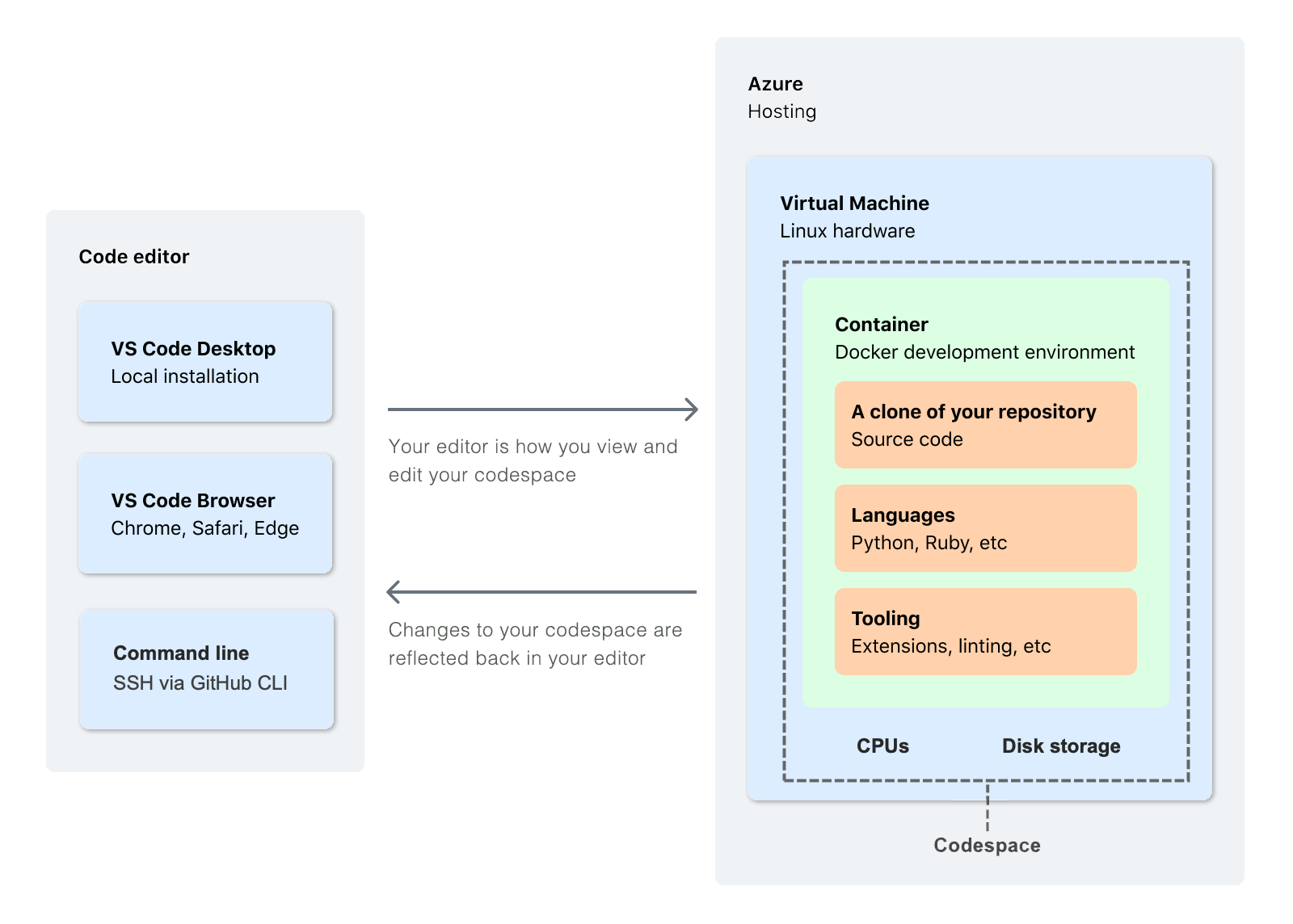
GitHub Codespaces
Cloud-hosted development environment
Full configured environment, often using dev containers
github.dev
Browser editor for quick edits and exploration
Lighter-weight editor, not a hosted compute environment like Codespaces
Dev container
Configuration for a repeatable development environment
Makes tools and setup consistent across developers
flowchart TD
A[Repository event] --> B[GitHub Actions workflow]
B --> C[Build or test]
C --> D[Report result]
E[Developer] --> F[Codespaces or local dev container]
F --> G[Edit and test]
G --> H[Pull request]
I[Copilot] -. assists with .-> G
Original visual synthesizing the modern-development tools listed in the GH-900 study guide.
What capabilities and billing model are intended for an individual user?
Business
What organization controls and policy needs are introduced for teams?
Enterprise
What additional enterprise governance and knowledge-context options matter?
Use the official documentation for Actions, Copilot, and Codespaces. Product availability can change, so prioritize current documentation over memorized product details.
Copilot is an AI-powered assistant that can help users generate, explain, transform, and reason about code and related tasks. It is assistance, not an automatic replacement for review, testing, security checks, or ownership.
Capability named by the objective
What to understand
Code suggestions
Copilot can propose code while a user works in a supported editor.
Chat
A user can ask questions, request explanations, or iterate on a task conversationally.
Agents and Agent Mode
Agent capabilities can help work through a task using an iterative tool-assisted workflow; users remain responsible for review.
Multi-model support
Available model choices can affect how users interact with supported Copilot experiences.
Policy management
Organizations can govern use through plan and organization settings.
Explain workflow, event, job, step, action, and runner in one sentence each.
Choose between Actions, Copilot, Codespaces, a dev container, and github.dev for a scenario.
Explain why an AI suggestion still needs human review and repository checks.
Describe the governance difference between an individual and an organization-managed Copilot context.
Suggested answers
Actions vocabulary: A workflow is the automated process, an event starts it, a job is a related set of work, a step is one task in that job, an action is reusable automation, and a runner executes the job.
Tool selection: Use Actions for event-driven automation, Copilot for AI-assisted coding work, Codespaces for a configured cloud development environment, a dev container to describe repeatable environment setup, and github.dev for quick browser editing or exploration.
Human responsibility: AI suggestions can be incomplete, incorrect, insecure, or unsuitable for a repository. People must review the change, run appropriate tests, and follow the repository's pull-request and security requirements.
Governance: An individual uses Copilot in a personal context. An organization-managed context adds centralized policy, administration, and controls that help a team govern use consistently.