Skip to content

Work with GitHub repositories

Repositories organize files, history, settings, and collaboration conventions. Be able to recognize common files and describe why maintainers use them.

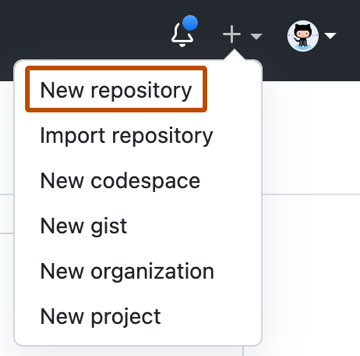
GitHub Create a new repository form
Official GitHub Docs product visual: the repository creation experience.
Repository item Purpose Exam-oriented distinction
README Explains a project to visitors and contributors Usually the first orientation document
LICENSE States permission terms for reuse Not the same as contribution guidance
CONTRIBUTING Explains how to participate Sets contribution expectations
CODEOWNERS Defines review ownership by path Helps route review requests
SECURITY Explains how to report security issues Supports responsible disclosure
Template repository Starts a new repository from a reusable structure Preserves a standard starting point
flowchart TD A[Repository] --> B[Files and folders] A --> C[Branches and history] A --> D[Settings and visibility] A --> E[Community health files] E --> F[README] E --> G[CONTRIBUTING] E --> H[SECURITY] E --> I[CODEOWNERS]

Original visual based on the repository structure and key files listed by Microsoft Learn.

Maintain deliberately

Practice Why it matters
Use meaningful branches Keeps work isolated until it is ready for review.
Keep project guidance current Reduces contributor uncertainty.
Review repository insights Helps understand activity and repository health.
Use templates where patterns repeat Makes new projects consistent and faster to start.

Study with Working with repositories and the official GH-900 study guide.

Repository anatomy

Repositories are more than file containers. They combine source content, history, branches, settings, access, automation, and contributor guidance.

Area What to recognize Example question cue
Files and folders The versioned project content Where should a setup instruction be documented?
Default branch The primary shared branch for a repository Which branch usually receives approved work?
Branches Isolated lines of work How can a change be proposed without directly changing the default branch?
Settings Visibility, access, branch rules, integrations, and features Which area controls who can act or how a repository is governed?
Insights Information about activity, traffic, dependencies, and repository health Which feature helps a maintainer understand visibility or activity?
Community files Documentation that guides visitors and contributors Which file explains a contribution or security process?

Community health files in context

File Audience Typical content Do not confuse it with
README Everyone visiting the repository Purpose, setup, use, examples, and high-level context A license or security reporting policy
LICENSE Users and contributors Legal permissions and conditions for reuse Instructions for submitting a change
CONTRIBUTING Potential contributors Development process, tests, coding conventions, and pull-request expectations Repository ownership rules
CODEOWNERS Maintainers and reviewers People or teams responsible for paths General user permissions
SECURITY Security researchers and maintainers Responsible disclosure and security reporting guidance A general bug report template

Create and organize repositories

When considering a new repository, reason through the following decisions.

Decision Questions to ask
Ownership Should the repository belong to an individual or an organization?
Visibility Who must be able to discover and access the repository?
Initialization Should it start with a README, license, or ignore rules?
Reuse Would a template repository produce a consistent starting point?
Collaboration Which community files, labels, and branch rules will contributors need?
Maintenance Which repository insights and dependency information should maintainers monitor?

Templates, forks, and branches

Tool Main purpose Relationship to the source
Branch Isolate a change inside one repository Shares repository history and is typically merged back.
Template repository Start a new repository with a reusable structure Creates a new project from a baseline.
Fork Create an independent copy, often to contribute to an upstream project Maintains a relationship that supports proposing changes upstream.

File and history management

Task Appropriate concept
Add a file to a proposed change Create or edit it in a branch, then commit it.
Understand a past change Review history, commits, or blame where appropriate.
Locate a repository by topic Use repository discovery and metadata such as topics.
Understand interest and activity Review stars, insights, metrics, and relevant dashboards.
Examine dependency-related information Use repository dependency insights and security-related features.

Maintenance habits

  1. Keep the README accurate as the project changes.
  2. Make contribution and security guidance discoverable.
  3. Use branches and pull requests for reviewable work.
  4. Keep labels, templates, and repository settings intentional.
  5. Review relevant insights and dependency information regularly.
  6. Retire stale branches and obsolete guidance.

Readiness check

  • Explain the distinct purpose of every community health file in the objective.
  • Choose between a branch, template repository, and fork for a short scenario.
  • Identify settings, files, or insights that support repository maintenance.
  • Describe why visibility and ownership are early repository decisions.
Suggested answers
  1. Community files: README orients visitors, LICENSE defines reuse terms, CONTRIBUTING explains how to participate, CODEOWNERS routes ownership and review, and SECURITY explains responsible security reporting.
  2. Branch, template, or fork: Use a branch for isolated work that stays in the same repository, a template repository to begin a new project from a reusable baseline, and a fork for an independent copy that can contribute changes back upstream.
  3. Maintenance evidence: Accurate guidance files, intentional settings, clear branch practices, templates and labels, plus insights and dependency information all help a repository remain understandable and maintainable.
  4. Early decisions: Ownership determines who administers the repository, while visibility determines who can discover and access it. Both influence collaboration, compliance, and the safe sharing of information.