Manage projects with GitHub
GitHub Projects helps teams view and organize work across issues and pull requests. Learn how project configuration supports a team workflow.
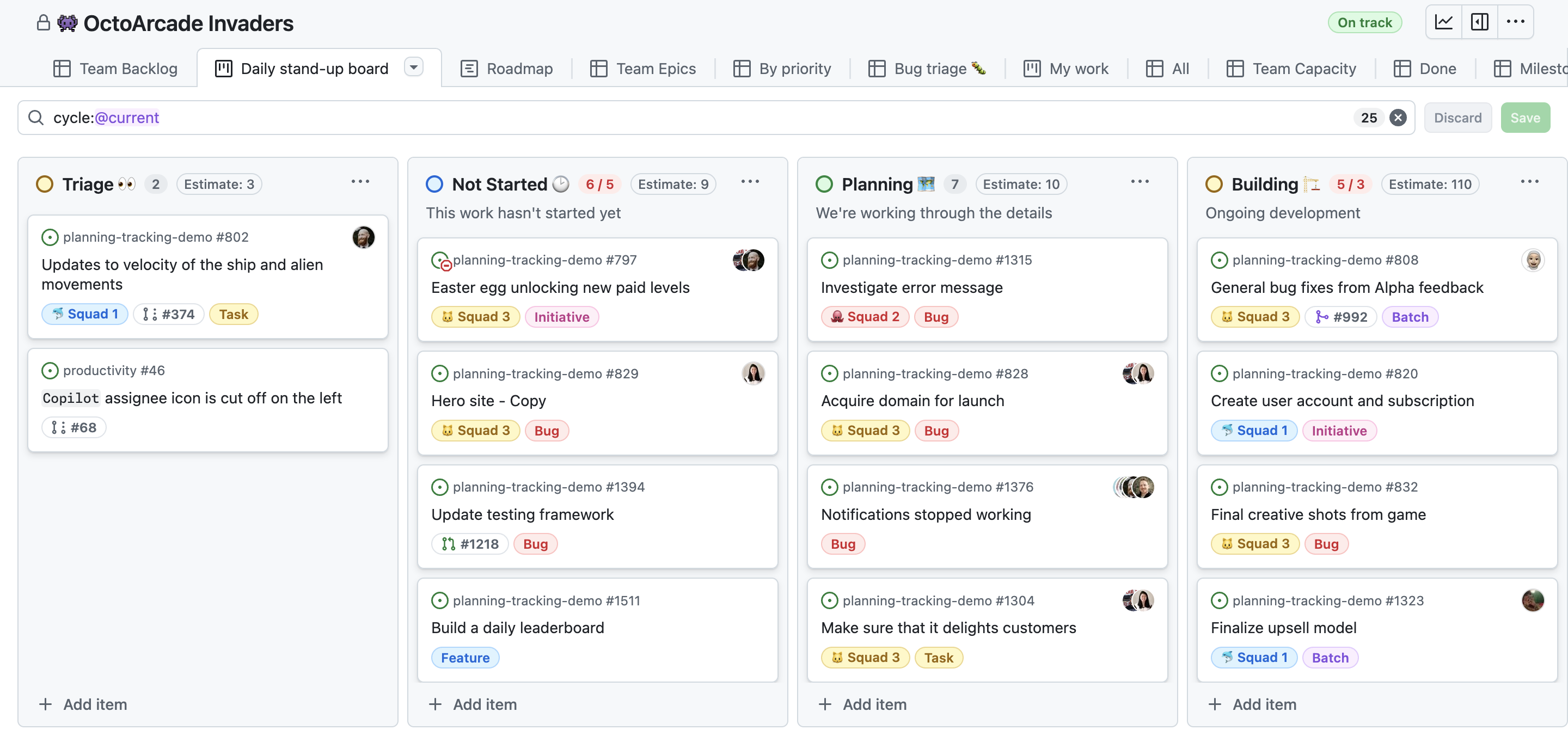
| Capability | What to understand |
|---|---|
| Layout | Different views make a backlog, board, or planning table easier to scan. |
| Custom fields | Capture information specific to a team's workflow. |
| Labels and milestones | Categorize and group work around shared outcomes or timeframes. |
| Workflows | Automate predictable project updates. |
| Insights | Use project data to understand progress and productivity. |
flowchart LR
A[Issue or pull request] --> B[GitHub Project]
B --> C[Fields and labels]
C --> D[Board, table, or roadmap view]
D --> E[Insights]
F[Workflow] --> B
Original visual based on the project layouts, workflows, and insights described in the official GH-900 objectives.
Scenario practice
| Scenario | A suitable feature |
|---|---|
| Triage incoming work by type | Labels and filters |
| Show progress through a shared workflow | Project view plus status field |
| Group work for a release | Milestone |
| Avoid repetitive project updates | Built-in workflow |
| See whether work is moving | Project insights |
Complete Manage your work with GitHub Projects for hands-on context.
Project building blocks
GitHub Projects can bring work from issues and pull requests into a shared planning and tracking view. The project is a work-management layer; the linked items still retain their repository context.
| Building block | Purpose | Example |
|---|---|---|
| Item | A tracked unit of work in the project | An issue, pull request, or draft item. |
| Field | A property used to organize or filter items | Status, priority, owner, iteration, or target date. |
| View | A way to see the same work from a different perspective | Table, board, or roadmap. |
| Layout | The visual arrangement used by a view | Columns on a board or rows in a table. |
| Filter | A rule that narrows visible items | Show only high-priority work assigned to one team. |
| Workflow | An automated project update | Set status when a linked item closes. |
Select a layout
| Layout | Best for | What to watch for |
|---|---|---|
| Table | Comparing many fields at once | Add the columns users need to make decisions. |
| Board | Visualizing a flow through status columns | Keep status definitions clear and mutually understood. |
| Roadmap | Viewing planned work across a time range | Keep date and iteration data current. |
Labels, milestones, and custom fields
| Feature | Scope | Good use |
|---|---|---|
| Label | Typically categorizes repository work | Classify a bug, feature, priority, or area. |
| Milestone | Groups work around a shared outcome or time boundary | Track work toward a release. |
| Custom field | Captures information in a Project | Track a project-specific priority, effort, or target date. |
| Assignee | Identifies a responsible person | Clarify ownership of a work item. |
| Saved reply | Reuses a frequent response | Speed up predictable communication without losing review. |
Configure a useful project
- Define the project outcome and the work items that belong in it.
- Choose a first view that suits the team's workflow.
- Add only the fields needed to make decisions.
- Establish labels, status values, and milestone conventions.
- Configure workflows for predictable updates.
- Use filters and saved views to help different roles focus.
- Review insights to identify stalled work or progress trends.
Project insights
Insights help convert project data into a progress view. Study the distinction between viewing an individual issue and using project-level information to reason about overall work.
| Question | Relevant project capability |
|---|---|
| What work is blocked or still in progress? | Board or filtered project view. |
| Which release outcome does this work support? | Milestone and project fields. |
| Is progress improving over time? | Project insights. |
| Which work needs an owner? | Assignee field and filtered view. |
| Which recurring update should not be manual? | Project workflow. |
Readiness check
- Select a table, board, or roadmap for three different planning questions.
- Distinguish labels, milestones, custom fields, and assignees.
- Explain how a workflow changes project data without replacing human ownership.
- Describe how project insights differ from a single issue or pull request.
Suggested answers
- Layout selection: A table is useful for comparing several fields, a board is useful for work moving across status columns, and a roadmap is useful for viewing planned work over time.
- Organization features: Labels categorize work, milestones group work around a release or shared outcome, custom fields capture project-specific information, and assignees identify who is responsible for a work item.
- Project workflow: A workflow can update a field when a predictable event happens, such as a linked item closing. It reduces repetitive administration, but a team still owns prioritization, status definitions, and decisions.
- Insights: A single issue or pull request describes one work item. Project insights use aggregated project information to help a team assess progress, trends, and productivity across its work.