Microsoft Intune Setup and Overview Hub
Atlanta, USA

Last updated: 2026-08-04
Microsoft Intune is a cloud-based endpoint management platform for securing identities, devices, apps, and access. This hub provides a practical deployment playbook for setting up Intune across different environments, including BYOD (bring your own device), corporate-owned devices, frontline/kiosk scenarios, and hybrid estates.
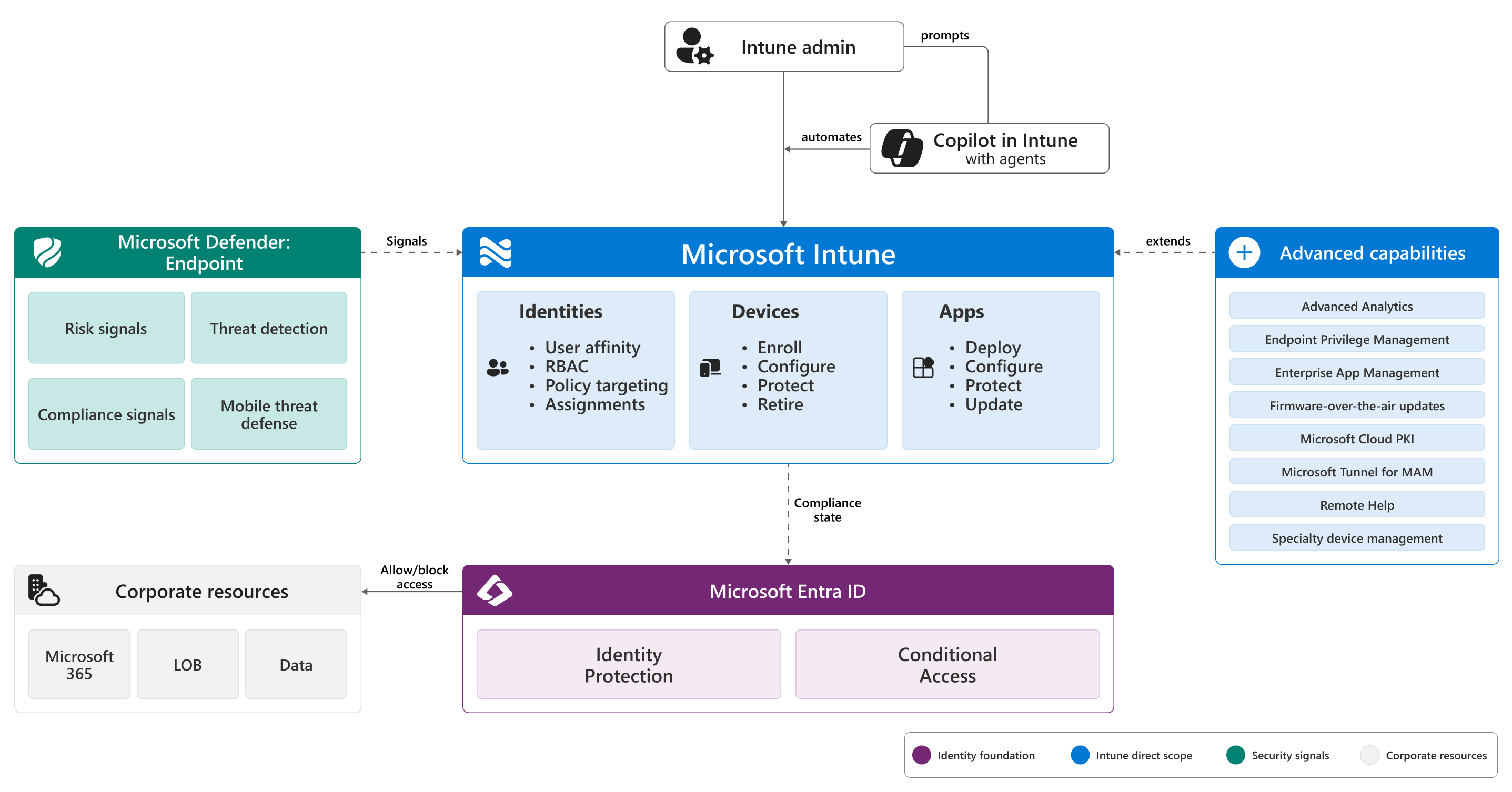
Source: What is Microsoft Intune?.
Warning
These guides are learning material. Confirm current support, pricing, and service behavior in the official documentation before production use.
Start Here
Understand Intune architecture, MDM (mobile device management) and MAM (mobile application management) strategy, and core decisions. Plan
Map objectives, licensing, and migration approach before implementation. BYOD (bring your own device)
Protect corporate data with app protection and Conditional Access. Corporate
Enroll and secure Windows, Apple, and Android corporate devices. Frontline
Design shared, kiosk, and dedicated device controls. Operate
Use compliance, enrollment, app, and security reporting for day-two operations.
Understand Intune architecture, MDM (mobile device management) and MAM (mobile application management) strategy, and core decisions. Plan
Map objectives, licensing, and migration approach before implementation. BYOD (bring your own device)
Protect corporate data with app protection and Conditional Access. Corporate
Enroll and secure Windows, Apple, and Android corporate devices. Frontline
Design shared, kiosk, and dedicated device controls. Operate
Use compliance, enrollment, app, and security reporting for day-two operations.
Implementation roadmap
- Establish the foundation: architecture, identity model, licensing, and network readiness.
- Choose environment strategy per platform: BYOD (bring your own device), corporate-owned, frontline, or hybrid.
- Build baseline controls: enrollment, compliance, configuration, app protection, and security baselines.
- Roll out in phases with pilot evidence, support readiness, and measurable success criteria.
- Operationalize reporting and continuous improvement.
Start with the right guide
| Need | Start with |
|---|---|
| Understand Intune architecture and service boundaries | Overview |
| Plan migration or greenfield deployment | Planning and licensing |
| Prepare network and firewall dependencies | Network and endpoints |
| Secure personal devices without full device enrollment | BYOD (bring your own device) and app protection |
| Deploy and control corporate-managed endpoints | Corporate-owned device management |
| Integrate with Configuration Manager | Hybrid and co-management |