Purview Insider Risk Management
Atlanta, USA (United States of America)

Last updated: 2026-07-27
References
Insider Risk Management correlates signals to identify potential malicious or inadvertent insider risks, such as intellectual-property theft, data leakage, and security-policy violations. It is built with privacy by design: users are pseudonymized by default, with role-based access controls and audit logs.
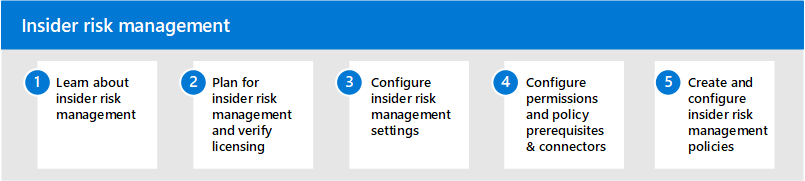
Source: Insider Risk Management overview.
Why it matters
Employees create, manage, and share data across many platforms. Insider Risk Management uses Microsoft 365 and Microsoft Graph signals to identify risk indicators, triage them, and act while respecting employee privacy.
| Without Insider Risk Management | With the solution |
|---|---|
| Departing-employee data theft is hard to see | Policies flag risky exfiltration indicators |
| Accidental leaks go unnoticed | Correlated signals surface inadvertent risk |
| Investigations lack privacy controls | Pseudonymization and role-based access apply |
| Actions lack an audit trail | Cases, actions, and reviews are recorded |
Value in one line: it identifies and triages risky data activity while protecting user privacy through pseudonymization and role separation.
Configure responsibly
- Learn the solution and verify licensing.
- Configure global settings, including privacy and pseudonymization.
- Assign least-privilege roles for analysts, investigators, and reviewers.
- Configure prerequisites, connectors, and policy indicators.
- Create policies, then triage alerts and manage cases with documented approvals.
Governance controls
- Keep pseudonymization enabled unless an authorized process requires identities.
- Separate policy administration from investigation and case action.
- Preserve indicators, alerts, case decisions, approvals, and outcomes as evidence.
- Escalate to eDiscovery or legal only through a defined, authorized workflow.
Common pitfalls
- Disabling pseudonymization by default, which raises privacy risk and can bias investigations.
- Creating broad policies that generate more alerts than the team can triage, which buries real risk in noise.
- Skipping the connectors and prerequisites that give policies the signals they need, so indicators never fire.
- Letting one role both tune policies and clear their alerts, which undermines the audit trail.
Business example
A policy detects a departing employee copying large volumes of sensitive files to personal storage. An analyst triages the pseudonymized alert, an authorized investigator confirms the activity, and the case is escalated for legal review with the indicators, decisions, and approvals preserved.