Purview Data Map and Collections
Atlanta, USA (United States of America)

Last updated: 2026-07-27
Official references
The Microsoft Purview Data Map is the foundation for data discovery and governance. It captures technical, business, operational, and semantic metadata about data across software as a service (SaaS), operational, on-premises, and multicloud systems, and keeps it current with built-in scanning and classification.
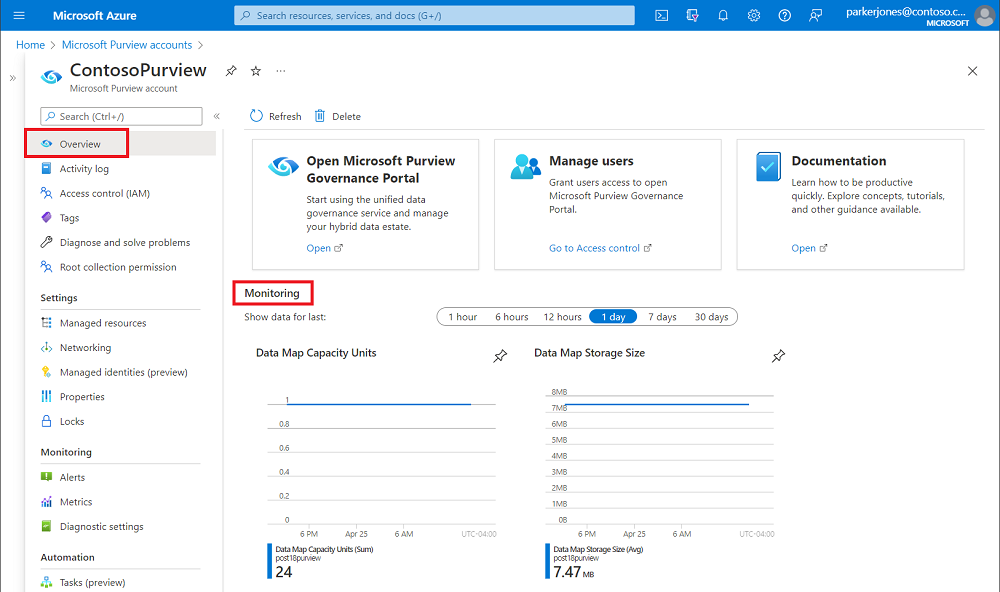
Source: Learn about Microsoft Purview Data Map.
Why it matters
The Data Map is the shared source of truth that every other governance capability reads from. Search, catalog discovery, access policies, and automatic labeling in the data estate all depend on the assets, classifications, and relationships the Data Map holds. If the map is incomplete or poorly organized, downstream governance is unreliable, and consumers fall back to shadow copies of data. A well-modeled map, by contrast, lets people find and understand data quickly and lets owners apply policy consistently.
The map captures four kinds of metadata. Technical metadata is the schema, data types, and columns discovered by scanning. Business metadata is the descriptions, glossary terms, and ownership people add. Operational metadata is the run status and history of scans and jobs. Semantic metadata is the collection structure and classifications. Together these turn a raw list of assets into a governed, searchable catalog.
Set up Data Map collections
- In the Microsoft Purview portal, confirm the tenant and Data Map capacity are available in the target region and assign a data governance administrator and domain owners.
- Create governance domains and collections that match accountable business areas, then assign collection administrators, data curators, and readers through Entra groups.
- Register one pilot data source in the correct collection and configure the authentication method, network path, and scan permissions.
- Create a scan rule set with only the classifications and scan scope required for the pilot, then schedule the scan during an approved window.
- Run the scan and validate discovered assets, schema, classifications, lineage, capacity-unit use, and access boundaries with the data owner.
- Add glossary terms, owners, critical data elements, and quality rules before onboarding the next source or expanding the scan scope.
How collections shape access
Collections are more than folders; they are the boundary for access control. A user's permissions apply within the collection they are granted, so the way you model collections directly determines who can see and curate which assets. Model them around accountable business domains so ownership is clear and access stays least-privilege. Overly broad collections concentrate access and risk, while an unbounded technical sprawl of collections becomes impossible to govern. Aim for a structure that mirrors how the business actually owns and consumes data.
Model collections and domains
- Align collections and governance domains to accountable business concepts, such as Finance or Marketing, not an unbounded technical inventory.
- Use collections to apply fine-grained access control so users see only the assets they own or consume.
- Organize discoverable data into data products so a consumer finds a complete, governed set rather than isolated tables.
- Attach glossary terms, critical data elements, and quality rules to scale governance from the domain down to the asset.
Plan capacity and cost
The Data Map bills through capacity units; each unit provides 25 operations per second and 10 GB (gigabytes) of metadata storage, and it scales elastically with load. Monitor Data Map capacity units and storage size in the Azure portal so growth stays understood and funded.
Capacity grows with both throughput and stored metadata, so cost is driven by how many assets you catalog and how often you scan and update them. Because the map autoscales, an unplanned broad scan can raise cost quietly. Set an alert on capacity units and storage size, review growth against the value each source delivers, and prune assets and scans that no longer serve a use case.
Verify and operate
- Confirm asset counts, classifications, and lineage match expectations after each scan.
- Reconcile collections and ownership as teams and data estates change.
- Monitor capacity units and storage trends, and alert on unexpected growth.
- Review glossary terms, critical data elements, and quality rules for accuracy.
Business example
A finance domain owner models a collection for finance data, groups reporting tables into a data product, and attaches a Customer ID (identifier) critical data element. Consumers request access to the product through self-service, while the owner monitors Data Map capacity units to keep metadata growth and cost predictable.