Purview Sensitivity Labels
Atlanta, USA (United States of America)

Last updated: 2026-07-27
Sensitivity labels classify and protect information. Define a small, understandable taxonomy, test user impact, and document encryption, marking, and access decisions before publishing labels broadly.
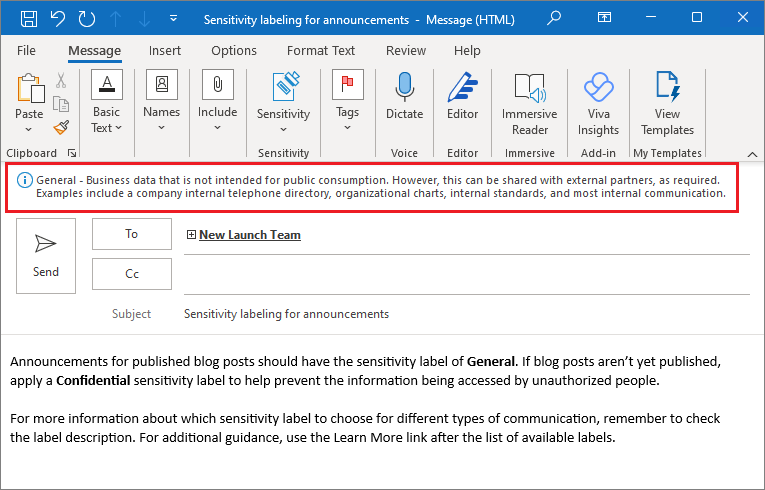
Source: Learn about sensitivity labels.
Design controls
- Keep the main label taxonomy small and describe the intended business use in plain language.
- Choose scopes deliberately: files and emails, meetings, groups and sites, or supported data assets.
- Test encryption, watermarks, headers, footers, external sharing, and offline access with representative users.
- Publish initially to a pilot group; label-policy priority and label priority affect the effective experience.
- Require a justification for downgrades only after user training and support procedures exist.
How labels travel with content
A sensitivity label is written into the metadata of a file or email, so it stays with the content wherever it goes, across devices, apps, and services, and even into some third-party tools that can read the label. When a label applies encryption, the protection and usage rights travel too, which is why a label can keep a document readable only to approved people even after it leaves your tenant. This persistence is the core value of labeling: protection is a durable property of the data rather than a setting on a single location.
Because a label carries real consequences, order and defaults matter. Label priority determines which label wins when content could match more than one, and label-policy priority resolves conflicts when a user is in more than one policy. A default label sets a baseline, but an encrypting default can block external sharing, so choose defaults carefully and pair mandatory labeling with training to avoid inaccurate classification.
Verify and operate
- Confirm labels appear for the intended users within the expected replication time.
- Validate encryption, marking, and access for internal, external, and guest users.
- Review label adoption, downgrade justifications, and mislabeling in activity explorer.
- Re-test label behavior after taxonomy, policy, or scope changes.
Business example
Finance publishes a Confidential label to a pilot group. The label applies a footer and encryption for approved employees, while a separate label supports external sharing. The team validates email, spreadsheet, mobile, and guest access before publishing the labels to the wider business.