Microsoft Purview Information Protection
Atlanta, USA (United States of America)

Last updated: 2026-07-27
References
Information Protection helps you discover, classify, and protect sensitive information wherever it lives or travels. It groups the capabilities to know your data, protect your data, and prevent data loss into one coordinated solution.
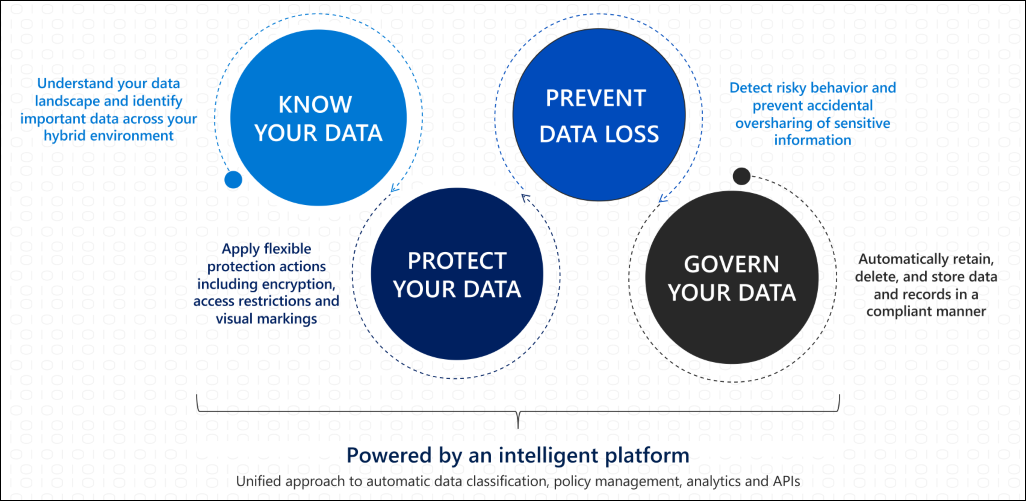
Source: Microsoft Purview Information Protection.
Why it matters
Sensitive content no longer stays behind a firewall; it moves across devices, apps, and services. Information Protection lets you attach classification and protection to the content itself, so it stays protected as it travels.
| Without Information Protection | With Information Protection |
|---|---|
| Sensitive data is unlabeled and unmonitored | Classification identifies and tracks sensitive content |
| Protection depends on where a file is stored | Encryption and marking travel with the content |
| Oversharing is discovered after the fact | Labels and data loss prevention reduce oversharing |
| Third-party stores are blind spots | Scanner and cloud-app integration extend coverage |
Value in one line: it makes sensitivity a durable property of the data, so protection follows the content across your estate.
Know your data
- Sensitive information types (SIT): identify data with built-in or custom patterns, keywords, confidence levels, and proximity.
- Trainable classifiers: identify content by example rather than pattern.
- Data classification, content explorer, and activity explorer: see where sensitive or labeled content lives and what users do with it.
Protect your data
- Sensitivity labels apply classification, encryption, and visual marking across apps, services, and devices.
- Message encryption, Double Key Encryption, and Customer Key address email and regulatory key-control scenarios.
- Information protection scanner discovers and labels on-premises data, while Defender for Cloud Apps extends labeling to cloud stores.
Prevent data loss
Data loss prevention, endpoint DLP (data loss prevention), the browser extension, and on-premises repository support reduce accidental sharing across Microsoft 365, devices, and file shares. Start in audit or simulation mode and tune with data owners.
Deploy
- Define the data you must know, protect, and prevent from leaking, with owners.
- Pilot sensitive information types and trainable classifiers on representative data.
- Publish a small label taxonomy and validate user, guest, and offline impact.
- Add DLP (data loss prevention) in audit mode, then enforce only after tuning and approvals.
- Extend to on-premises and cloud stores with the scanner and cloud-app integration.
Common pitfalls
- Publishing a large label taxonomy before piloting, which confuses users and reduces labeling accuracy; effectiveness drops sharply beyond a handful of main labels.
- Setting an encrypting label as the default, which can block legitimate external sharing.
- Treating classification as done; sensitive information types and trainable classifiers need testing and tuning against real content.
- Rolling out prevention before protection, so DLP (data loss prevention) fires on content that was never correctly classified in the first place.
Business example
A privacy team enables sensitive information types for regulated identifiers, publishes a Confidential label with encryption to a pilot group, and runs a DLP (data loss prevention) policy in simulation mode. After validating classification accuracy and user impact with data owners, they extend the scanner to an on-premises file share.