Microsoft Defender CSPM Overview
Last updated: 2026-07-27
References
Cloud Security Posture Management (CSPM) discovers resources, evaluates their configuration, and prioritizes security risk across Azure, AWS, and GCP. It answers three questions continuously: what do I have, how is it exposed, and what should I fix first. Foundational CSPM is free and turned on for every connected environment; Defender CSPM adds the context that separates a long list of findings from an actionable, risk-ranked plan.
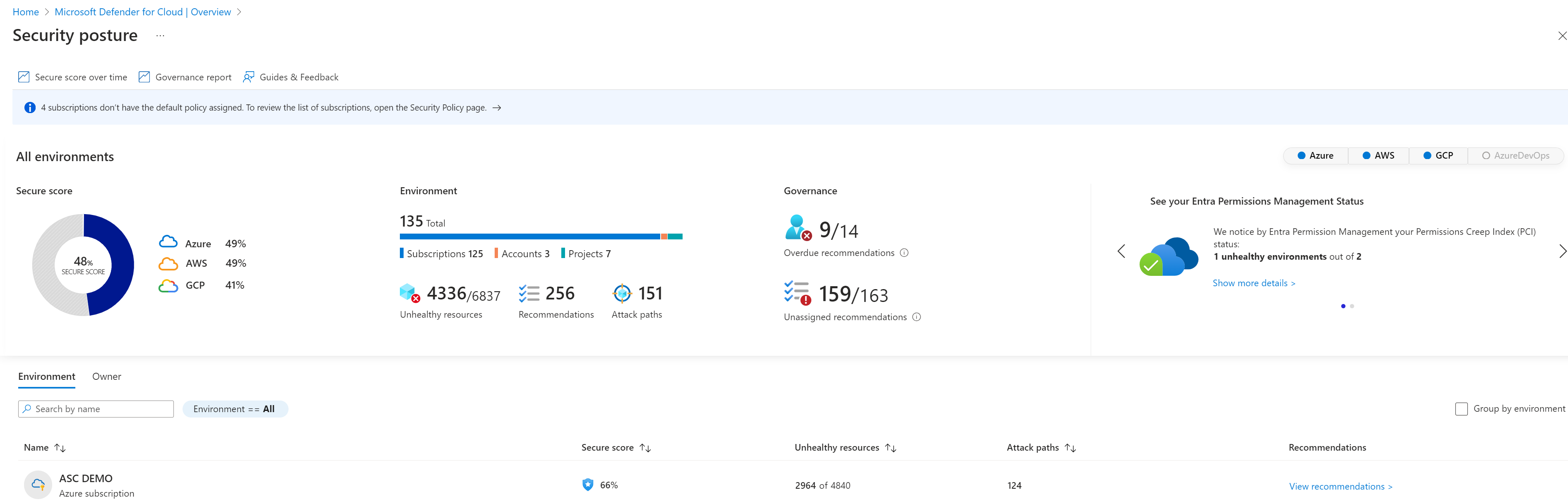
Source: Secure score in Microsoft Defender for Cloud.
Why enable it
Most cloud incidents begin with a preventable misconfiguration: a public storage container, an over-permissioned identity, or an internet-exposed management port. CSPM finds that risk before an attacker does and shows the shortest path to fix it.
| Without CSPM | With Defender CSPM enabled |
|---|---|
| Misconfigurations surface manually or during an incident | Continuous assessment flags risky configurations automatically |
| Findings are a flat list with no clear starting point | Attack paths and risk prioritization rank the exposures that matter |
| Multicloud posture is scattered across consoles | Azure, AWS, and GCP posture is unified in one secure score |
| Progress is hard to prove to leadership | Secure score trends quantify risk reduction over time |
Value in one line: CSPM converts thousands of raw findings into a ranked, measurable remediation plan that shrinks the attack surface before it is exploited.
How it works
CSPM does not need agents to start. When you connect an Azure subscription, an AWS account, or a GCP project, Defender for Cloud reads the cloud provider's own APIs to build an inventory and continuously compares every resource against the Microsoft Cloud Security Benchmark and any regulatory standards you assign. Each gap becomes a recommendation, each recommendation affects the secure score, and the score gives you one percentage to track and report over time.
Defender CSPM adds a graph on top of that inventory. Agentless scanning takes a point-in-time snapshot of disks, identities, and configurations without installing anything, and the cloud security graph links those facts together. Cloud Security Explorer lets you query the graph, for example, "internet-exposed VMs with a known vulnerability and a path to sensitive data," and attack path analysis walks the graph automatically to show the chained steps an attacker could take from exposure to impact.
Plans
| Plan | Main capabilities |
|---|---|
| Foundational CSPM | Asset inventory, security recommendations, secure score, and Microsoft Cloud Security Benchmark |
| Defender CSPM | Attack paths, cloud security explorer, governance, risk prioritization, agentless scanning, and data or AI context where supported |
Enable
- In Defender for Cloud, open Environment settings.
- Select the Azure subscription, AWS account, or GCP project hierarchy.
- Turn on Defender CSPM when advanced capabilities are required.
- Open Settings & monitoring and review each extension and its dependencies.
- Assign standards and regulatory initiatives at the correct management scope.
- Exempt resources only with an owner, justification, and expiration date.
Verify and operate
- Confirm inventory is complete and recommendations have populated.
- Review secure score by control, but prioritize findings by exploitable risk.
- Validate agentless scanning coverage, permissions, region support, and freshness.
- Assign governance owners and remediation due dates.
- Use Cloud Security Explorer and attack paths to investigate exposure chains.

Source: Attack path analysis.
Architecture and prerequisites
- Onboarding model: foundational CSPM activates automatically for connected Azure subscriptions; Defender CSPM is a paid plan enabled per subscription, AWS account, or GCP project in Environment settings.
- Agentless scanning: creates a temporary snapshot of managed disks using a Microsoft-managed identity, analyzes it in an isolated Microsoft environment, and deletes it. This requires no in-guest agent and has no runtime performance impact.
- Permissions: onboarding needs Security Admin or Owner at the target scope, plus reader-level access to the cloud provider for multicloud connectors.
- Standards engine: assessments run as Azure Policy definitions against the Microsoft Cloud Security Benchmark and any assigned regulatory initiatives (for example ISO 27001, PCI DSS, NIST SP 800-53).
- Export: secure score and recommendations can stream to Log Analytics or Event Hubs through continuous export for Microsoft Sentinel or a data lake.
Query the cloud security graph
Cloud Security Explorer runs graph queries over discovered assets, network exposure, identities, and data. High-signal examples include:
- Internet-exposed virtual machines that contain a high-severity vulnerability.
- Managed identities whose permissions create a path to a storage account holding sensitive data.
- Publicly reachable databases accessible from a workload with a known CVE.
Attack path analysis pre-computes these chains and scores each path by exploitability and blast radius, so remediation can target the single choke point that breaks the most paths.
Scale with governance
- Enable Defender CSPM at the management-group scope so new subscriptions inherit it.
- Use governance rules to auto-assign an owner and remediation due date to recommendations by tag or scope.
- Drive remediation through Azure Policy DeployIfNotExists and infrastructure-as-code rather than manual portal fixes.
- Track secure score over time as a program KPI and alert on regressions through continuous export.
Note
CSPM identifies risk; workload plans add threat detection. Enabling Defender CSPM does not automatically enable every Defender workload protection plan.
Operational decisions
- Define a risk owner and remediation deadline for every internet-exposed or attack-path finding; do not use secure score as the only success measure.
- Use policy in audit mode to prove the proposed control will not block a valid deployment before moving it to deny or deploy-if-not-exists.
- Retain the affected resource, identity path, business owner, exception expiry, and remediation evidence with the recommendation record.
Business example
A platform team connects its Azure subscriptions and discovers a public virtual machine with an exposed management port. Attack path analysis also shows that the VM's managed identity can read a storage account tagged
data-classification: pii. Instead of remediating dozens of unrelated recommendations, the team closes the internet exposure, removes the excessive storage role, and records the secure-score improvement as evidence that it broke the highest-risk path.