DevOps (development and operations) Security in Microsoft Defender for Cloud
Last updated: 2026-07-27
References
Defender for Cloud connects source-control and pipeline environments so security teams can see code-to-cloud context. Supported connectors include GitHub, Azure DevOps (development and operations), and GitLab, with capability differences documented by Microsoft. The goal is to catch exposed secrets, vulnerable dependencies, and insecure infrastructure-as-code in the pipeline, where fixes are cheapest.
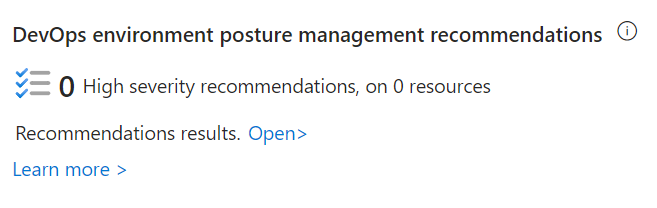
Source: Overview of DevOps (development and operations) security.
Why enable it
Most cloud risk is written in code long before it is deployed. Connecting DevOps (development and operations) platforms lets Defender relate a finding in a repository to the resource it becomes in the cloud, so teams fix the root cause instead of patching runtime.
| Without DevOps (development and operations) security | With connectors enabled |
|---|---|
| Secrets and IaC (infrastructure as code) flaws are found after deployment | Scanning surfaces them in the repository and pipeline |
| Findings lack cloud context | Code-to-cloud mapping links code to running resources |
| Ownership of a finding is unclear | Results route to the repository and pipeline owners |
| Security and developers use separate tools | Findings appear in one posture view for both teams |
Value in one line: it shifts security left, catching exposed secrets and insecure infrastructure-as-code before they ever reach production.
How it works
A DevOps (development and operations) connector authorizes Defender for Cloud to read metadata from your GitHub, Azure DevOps (development and operations), or GitLab environment. Scanning surfaces exposed secrets, vulnerable dependencies, insecure infrastructure-as-code, and container image findings in the repositories and pipelines where they originate, and the results appear in Defender for Cloud with the rest of your posture.
The differentiator is code-to-cloud mapping: when Defender CSPM (cloud security posture management) is enabled, a finding in a template can be related to the live resource it deploys, so teams fix the root cause in source instead of repeatedly patching runtime. Findings route to the repository and pipeline owners who can actually resolve them.
Enable
- Inventory organizations, projects, groups, repositories, pipelines, and owners.
- In Defender for Cloud Environment settings, add the DevOps (development and operations) connector.
- Grant the minimum required authorization and select the intended scope.
- Install or authorize required scanning components for the chosen platform.
- Enable Defender CSPM (cloud security posture management) when advanced code-to-cloud context is required.
- Define ownership and service-level objectives for findings.
Verify and operate
- Confirm repositories and their cloud-resource relationships appear in inventory.
- Verify infrastructure-as-code, secret, dependency, and container findings that are supported by the selected connector and licensing.
- Revoke test credentials immediately; never commit real secrets for validation.
- Send remediation to the repository owner and fix source before redeployment.
- Review connector permissions, inactive repositories, and coverage drift.
Architecture and prerequisites
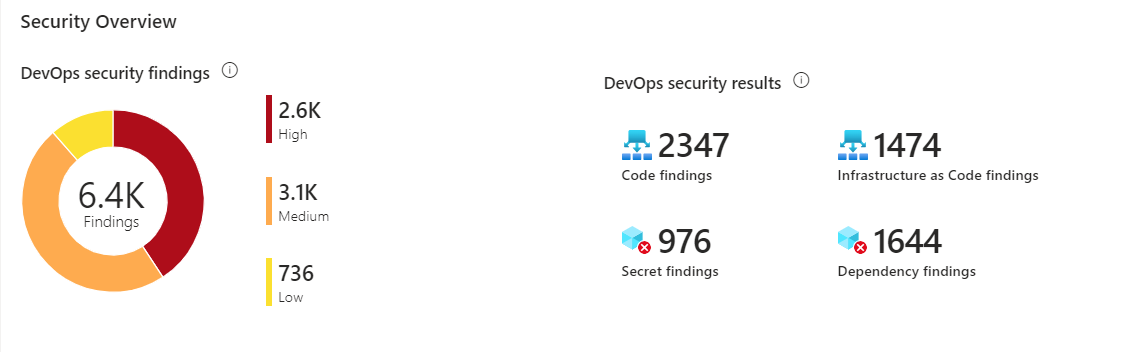
Source: Overview of DevOps (development and operations) security.
- Connectors: GitHub (app-based), Azure DevOps (OAuth (Open Authorization)), and GitLab; capability coverage differs by platform and is documented by Microsoft.
- Scanners: secret scanning, dependency scanning (SCA (software composition analysis)), infrastructure-as-code, and container image scanning run in the pipeline or via the connector, and results roll up to Defender for Cloud.
- Code-to-cloud: Defender CSPM (cloud security posture management) links a repository finding to the deployed resource so remediation happens at the source.
- Least privilege: grant the connector the minimum scope and prefer read-only where the workflow allows.
Operationalize findings
- Add secret and IaC (infrastructure as code) scanning as required pipeline checks so a failing scan blocks merge.
- Route findings to the repository or pipeline owner with an SLA (service-level agreement) and track mean time to remediate.
- Never commit real secrets for testing; if a secret is exposed, revoke and rotate it before closing the finding.
- Review connector permissions, inactive repositories, and coverage drift on a schedule.
Note
A DevOps (development and operations) connector does not protect a running workload by itself. Enable the appropriate workload plan for runtime detection and response.
Operational decisions
- Define severity and remediation SLAs (service-level agreements) by repository criticality, deployment reach, and whether a finding maps to a currently deployed resource.
- Treat credential revocation as a coordinated deployment change: identify all consumers and validate replacement authentication before disabling the secret.
- Retain repository, commit, pipeline run, finding ID (identifier), deployed-resource link, remediation pull request, and exception expiry for auditability.
Business example
A repository scan finds an Azure service-principal secret in an old infrastructure template. The team revokes the credential immediately, replaces it with workload identity federation, and makes secret scanning a required pull-request check. The code-to-cloud link identifies the deployed resource, allowing the team to verify that no remaining workload depends on the revoked secret.