Microsoft Defender for Cloud Apps Overview
Last updated: 2026-07-27
References
Defender for Cloud Apps is a cross-SaaS security solution for discovering cloud use, assessing application risk, protecting connected applications, and applying session and access controls with Microsoft Entra Conditional Access.
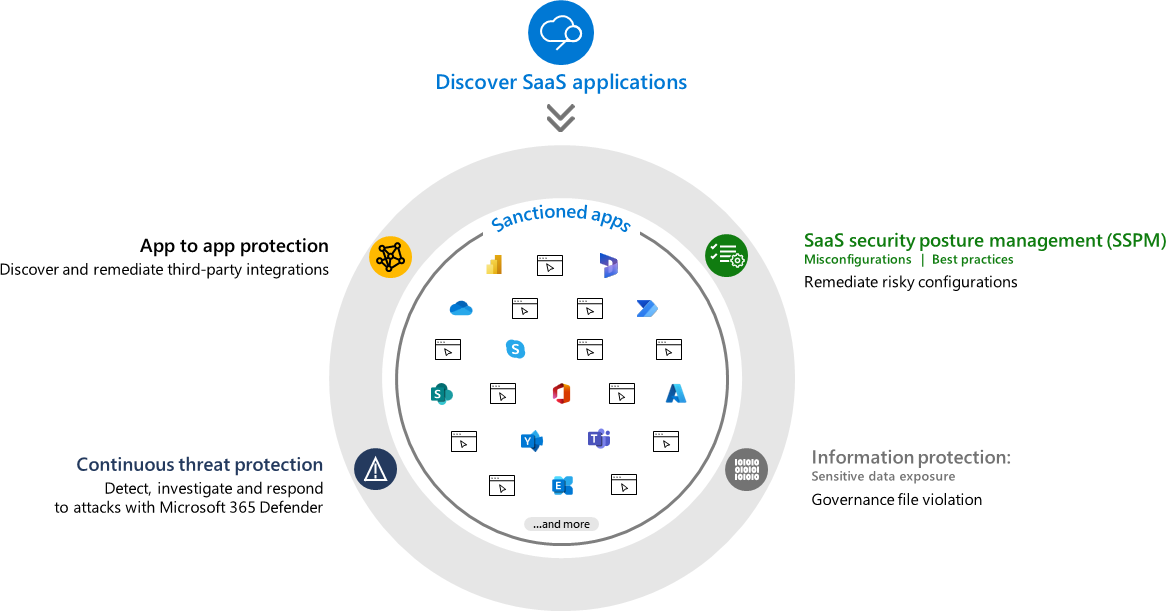
Source: Microsoft Defender for Cloud Apps overview.
Why enable it
Employees adopt software as a service (SaaS) apps faster than security can review them, and sensitive data quietly spreads across tools nobody sanctioned. Defender for Cloud Apps reveals that shadow IT, scores each app's risk, and can control risky sessions and Open Authorization (OAuth) grants in real time.
| Without Defender for Cloud Apps | With it enabled |
|---|---|
| Shadow IT usage is unknown | Cloud Discovery reveals apps in use and their risk |
| Risky OAuth grants persist unnoticed | App Governance flags and controls OAuth apps |
| SaaS activity has no unified audit | Connectors provide activity logs and anomaly detection |
| Access is all-or-nothing | Conditional Access App Control governs sessions live |
Value in one line: it turns invisible SaaS sprawl into a governed, monitored estate with real-time control over risky access and data movement.
How it works
Defender for Cloud Apps operates as a cloud access security broker. Cloud Discovery analyzes traffic logs, often from Defender for Endpoint, to reveal which SaaS apps are in use and score each app's risk, exposing shadow IT. App connectors then use the APIs of sanctioned apps to pull activity logs, detect anomalies, and apply file and governance policies.
For real-time control, Conditional Access App Control routes sessions through a reverse proxy so actions such as download or copy can be inspected and blocked as they happen, and App Governance monitors OAuth applications for risky permissions and behavior. Its signals also flow into Defender XDR.
Capability map
| Need | Capability |
|---|---|
| Discover shadow IT | Cloud Discovery from network or endpoint signals |
| Investigate SaaS activity | App connectors, activity logs, and anomaly detection |
| Govern OAuth applications | App Governance and OAuth app controls |
| Control sessions in real time | Conditional Access App Control |
| Protect files and data | File policies and Microsoft Purview integrations |
Configure
- Confirm licensing, supported apps, privacy, and administrator roles.
- Integrate Defender for Endpoint or upload supported traffic logs for discovery.
- Connect sanctioned SaaS apps with least-privilege connectors.
- Define app risk, activity, anomaly, OAuth, and file policies.
- Pilot Conditional Access App Control with report-only policies first.
- Assign owners for unsanctioned apps and risky OAuth grants.
Verify and operate
- Confirm discovery data and connector status are current.
- Review false positives before enabling automated governance actions.
- Test session controls with emergency access accounts excluded appropriately.
- Reauthorize expiring connectors and remove abandoned integrations.
Operational decisions
- Maintain an approved-app catalog with business owner, data classification, and review cadence; Cloud Discovery alone does not decide whether an app is allowed.
- Validate session controls with the application owner and emergency-access users before blocking downloads or applying real-time reverse-proxy controls.
- Retain application ID, user, session action, file or activity reference, policy result, exception expiry, and business-owner decision with the alert.
Business example
Cloud Discovery identifies an unsanctioned file-sharing service used by a product team. Security reviews its risk score and replaces it with an approved connector. For a sanctioned SaaS app, a Conditional Access App Control session policy blocks downloads to unmanaged devices while allowing browser-only access, reducing data exposure without stopping the team's workflow.
Architecture and prerequisites
- Cloud Discovery: analyzes traffic logs from Defender for Endpoint or logs uploaded from proxies and firewalls to reveal and risk-score SaaS apps.
- App connectors: API-based connectors to sanctioned apps pull activity, files, and configuration for anomaly detection and governance.
- Conditional Access App Control: routes selected sessions through a reverse proxy, integrated with Entra Conditional Access, to enforce real-time session controls.
- App Governance: monitors OAuth apps for risky permissions and behavior.
Advanced hunting example
Investigate high-volume SaaS downloads in the unified schema:
CloudAppEvents
| where Timestamp > ago(24h)
| where ActionType == "FileDownloaded"
| summarize downloads = count() by AccountUpn, Application, bin(Timestamp, 1h)
| where downloads > 100
Find activity from a specific source address across connected applications:
CloudAppEvents
| where Timestamp > ago(24h)
| where IPAddress == "203.0.113.10"
| summarize actions = count(), applications = make_set(Application, 20)
  by AccountUpn, IPAddress, bin(Timestamp, 1h)
| order by actions desc
Pilot session policies in report-only mode with emergency-access accounts excluded, and reauthorize expiring connectors on a schedule.