Microsoft Defender for Databases Overview
Last updated: 2026-07-27
References
Defender for Databases is a family of data-workload protections. Enable the subplan that matches the database engine and hosting model. Databases hold the most sensitive data in most environments, so they are a primary target for injection, brute force, privilege abuse, and exfiltration.
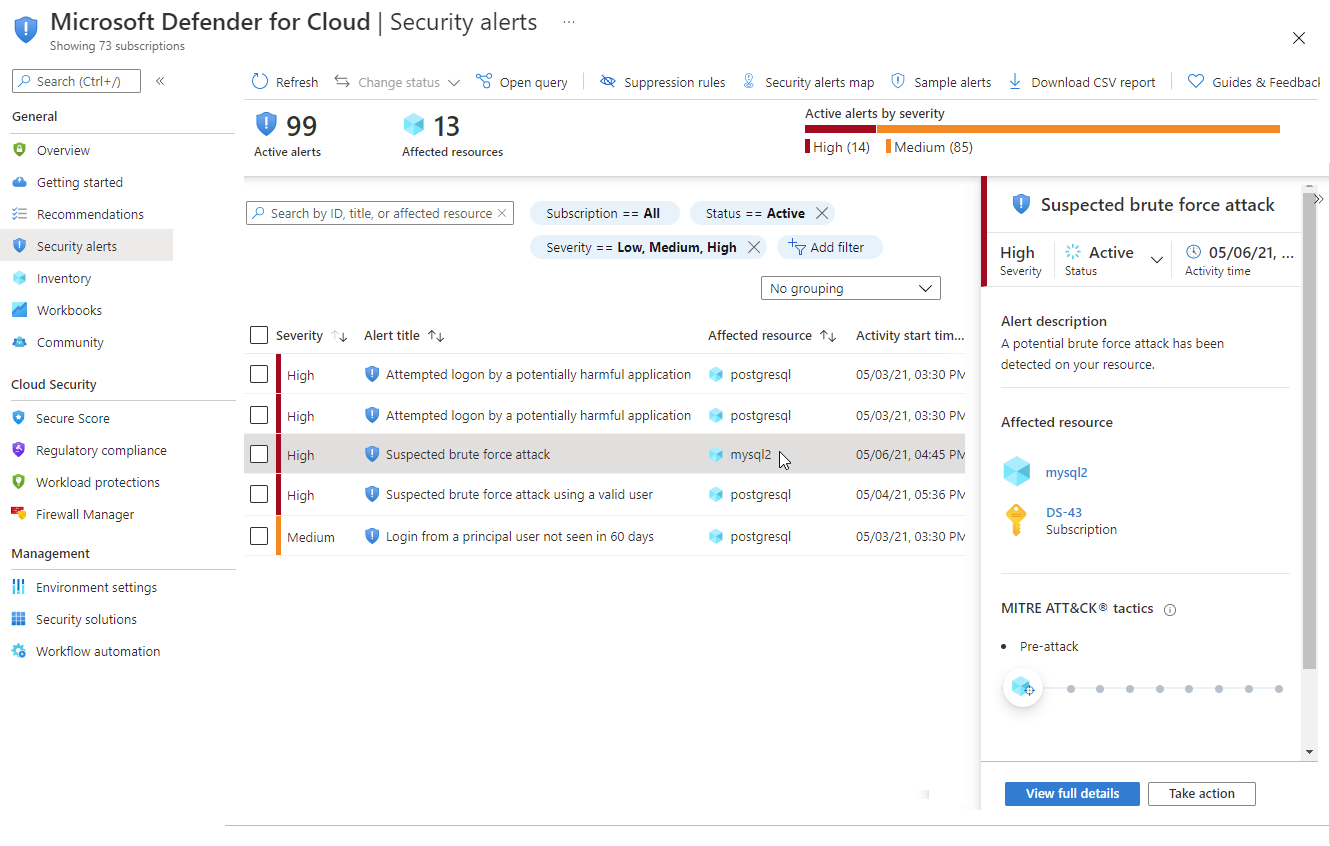
Source: Overview of Defender for Databases.
Why enable it
Attackers who reach a database rarely trigger platform alarms; they use valid queries and stolen credentials. Defender for Databases applies behavioral analytics and threat intelligence to flag anomalous access and known attack patterns against the exact engine you run.
| Without Defender for Databases | With the matching subplan enabled |
|---|---|
| SQL injection and brute force are found in raw audit logs | Behavioral detections raise prioritized alerts |
| Anomalous access looks like normal query traffic | Unusual locations, principals, and volumes are highlighted |
| Vulnerability posture is assessed ad hoc | Built-in vulnerability assessment reports drift (where supported) |
| Each engine is monitored differently | Consistent coverage across Azure SQL, open-source, and Cosmos DB |
Value in one line: it catches credential-based and injection attacks on your data tier that infrastructure monitoring simply cannot see.
How it works
Defender for Databases attaches to the database service rather than the host. For each supported engine it applies behavioral analytics and threat intelligence to query and login telemetry, learning what normal access looks like and alerting on deviations such as a brute-force login, a SQL injection pattern, or access from an unfamiliar principal or location. Where the engine supports it, vulnerability assessment also scans the database configuration and schema for weaknesses.
Because it is a family of subplans, coverage is engine-specific: Azure SQL, SQL Server on machines, open-source relational databases, and Azure Cosmos DB each have their own subplan and meter. Alerts flow into Defender for Cloud and the Defender portal, so a database alert can be correlated with the identity and application evidence around it.
Workload map
| Workload | Protection family |
|---|---|
| Azure SQL Database and Azure SQL Managed Instance | Defender for Azure SQL |
| SQL Server on Azure VM or Arc-enabled machine | Defender for SQL servers on machines |
| Azure Database for PostgreSQL, MySQL, or MariaDB where supported | Defender for open-source relational databases |
| Azure Cosmos DB | Defender for Azure Cosmos DB |
Enable
- Inventory database engines, hosting models, subscriptions, and data owners.
- Open Environment settings, select the subscription, and choose Databases.
- Enable only the required subplans and inspect resource-level overrides.
- Configure auditing and vulnerability assessment prerequisites where applicable.
- Restrict network paths, use managed identities, and minimize database privileges.
- Route alerts to database and incident-response teams.
Verify and operate
- Confirm each database maps to the intended enabled subplan.
- Review alert and recommendation availability for that exact engine.
- Establish an approved test method; never run attack simulations on production.
- Correlate database alerts with identity, application, and network evidence.
- Track unprotected instances and stale vulnerability findings.
Architecture and prerequisites
- Azure SQL / Managed Instance: protection is built into the service with no agent; pair with SQL vulnerability assessment and auditing to Log Analytics.
- SQL Server on machines: requires the SQL IaaS or Arc extension and the Azure Monitor Agent to relay events.
- Open-source relational (PostgreSQL, MySQL, MariaDB): agentless where supported by the plan and region.
- Azure Cosmos DB: agentless control-plane and data-plane analysis.
- Permissions: Security Admin / Owner to enable subplans; database-level access is not required for detection.
Detections and MITRE ATT&CK
| Example detection | ATT&CK tactic |
|---|---|
| SQL injection payload pattern | Initial Access / Execution |
| Brute-force or spray of database logins | Credential Access |
| Access from an unfamiliar principal or geography | Defense Evasion |
| Anomalous data-extraction volume | Exfiltration |
Detections are per-engine; validate only with an approved, non-production test. Export alerts to Sentinel (SecurityAlert) and correlate with AzureDiagnostics audit records for full query context.
Important
A generic Databases toggle can expose separate subplans and charges. Review the current plan configuration and pricing before broad enablement.
Operational decisions
- Agree which team owns database containment, credential rotation, and recovery; a security alert must not cause uncoordinated production data loss.
- Correlate alerts with audit logs and application releases before blocking a principal, then document the approved emergency access path.
- Retain database name, server, principal, client IP, query or audit reference, containment action, and validation result.
Business example
A production Azure SQL Database raises an alert for repeated failed logins from a new internet address followed by a successful privileged login. The database owner compares the alert with SQL auditing and Entra sign-in evidence, rotates the application credential, and restricts the firewall to the approved private endpoint. The incident remains linked to the application and identity evidence in Defender XDR.