Microsoft Defender for Cloud on Google Cloud
Last updated: 2026-07-27
References
Defender for Cloud connects Google Cloud organizations or projects to provide cloud posture management and selected workload protections for supported GCP resources.
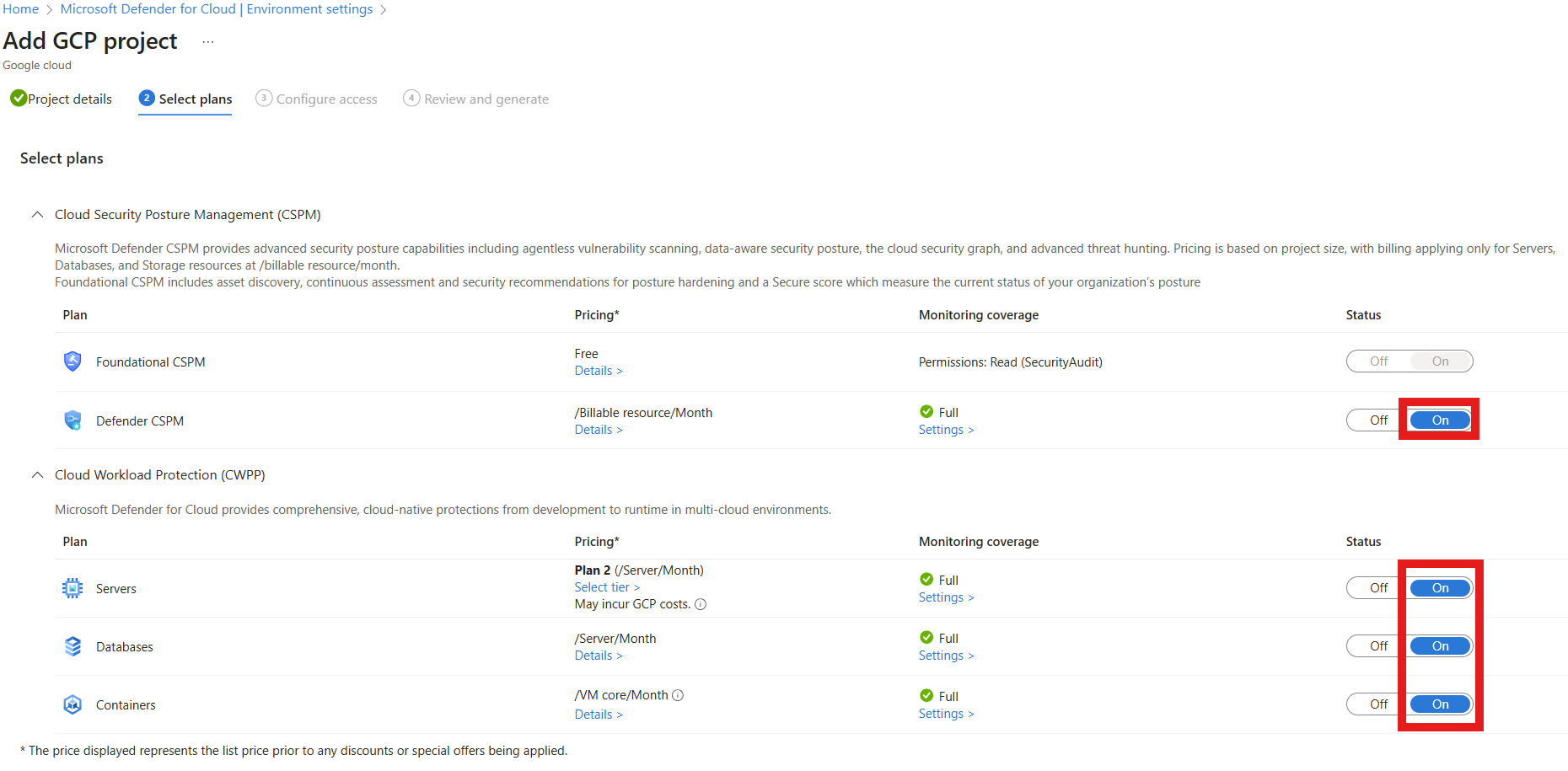
Source: Connect your GCP projects to Microsoft Defender for Cloud.
Why enable it
Google Cloud projects proliferate quickly and often sit outside the central security program. A GCP connector applies the same benchmark, posture analysis, and workload protection you use elsewhere, so multicloud does not mean multi-blind-spot.
| Without a GCP connector | With GCP connected |
|---|---|
| GCP risk is measured in a separate tool | GCP posture joins one unified secure score |
| Project sprawl hides ungoverned resources | Discovery inventories projects and resources centrally |
| Compute Engine and GKE use isolated tooling | Defender for Servers and Containers extend to GCP |
| Findings lack cross-cloud context | Attack paths and explorer span clouds |
Value in one line: it folds Google Cloud into the same posture and threat model as Azure and AWS, so risk is compared on one scale.
How it works
A Google Cloud Platform (GCP) connector relies on workload identity federation and dedicated service accounts to grant Defender for Cloud read access without long-lived keys. Foundational cloud security posture management (CSPM) then evaluates GCP resources against the multicloud benchmark, and workload plans extend Defender for Servers and Defender for Containers to eligible Compute Engine, GKE, and Artifact Registry resources.
Discovered projects and resources join the unified inventory and secure score, so Google Cloud risk is compared directly with Azure and AWS and can appear in the same attack paths and Cloud Security Explorer queries.
Typical coverage
- Foundational CSPM and recommendations mapped to multicloud standards.
- Defender CSPM inventory, attack-path, and agentless capabilities where supported.
- Defender for Servers coverage for eligible Compute Engine machines.
- Defender for Containers coverage for eligible GKE and Artifact Registry resources.
- Additional protection only when listed in the current GCP support matrix.
Connect
- Decide whether to connect a GCP organization or selected projects.
- In Defender for Cloud Environment settings, create a GCP connector.
- Select plans and inspect required Google Cloud and Azure permissions.
- Run the provided onboarding script or deployment in the intended GCP scope.
- Configure optional agentless, server, and container components.
- Compare discovered projects and resources with Cloud Asset Inventory.
Verify and operate
- Confirm connector health, project coverage, regions, and scan freshness.
- Verify service accounts, workload identity federation, and required application programming interfaces (APIs).
- Review GCP API usage, data handling, and Defender plan charges.
- Route findings to the correct project and workload owner.
- Monitor newly created projects and organization-policy changes for drift.
Architecture and prerequisites
- Connector model: onboard a single project or an entire organization; the onboarding runs a Google Cloud deployment that provisions the required service accounts.
- Identity: uses workload identity federation, so Defender for Cloud authenticates without long-lived service-account keys.
- Plans: foundational CSPM plus Defender for Servers (Compute Engine via Arc and Microsoft Defender for Endpoint (MDE)) and Defender for Containers (Google Kubernetes Engine (GKE) and Artifact Registry) where eligible.
- APIs and scanning: onboarding enables the required Google Cloud APIs; agentless scanning snapshots persistent disks.
- Permissions: Security Admin / Owner in Azure plus Google Cloud roles to run the deployment.
Detections and operations
CSPM maps GCP resources to the Microsoft Cloud Security Benchmark and standards such as CIS GCP. Confirm service accounts, workload identity federation, and enabled APIs after onboarding, and monitor new projects and organization-policy changes for drift.
Note
Connecting an organization does not imply that every GCP service receives runtime protection. CSPM breadth and workload-plan support are different.
Operational decisions
- Document the GCP organization, folders, projects, connector identity, and delegated administrators so connector permissions remain reviewable over time.
- Coordinate containment with GCP owners; changing a firewall rule or service account can affect workloads outside the Defender portal’s inventory view.
- Retain project ID, resource URI, principal, IAM or firewall delta, audit-log reference, and recovery validation with the incident record.
Business example
A GCP organization connection discovers a Compute Engine virtual machine (VM) with a public Secure Shell (SSH) rule and an outdated operating system. The cloud team closes SSH to a controlled administration path, Arc-enables the VM, and enables Defender for Servers for the project. They confirm the resulting MDE device record and vulnerability finding appear in the same portal as their Azure servers.