Microsoft Defender for Resource Manager Overview
Last updated: 2026-07-27
References
Defender for Resource Manager monitors Azure resource-management operations for suspicious control-plane activity, including behavior associated with credential abuse, unusual administration, or destructive changes. Azure Resource Manager is the management layer every deployment, role change, and configuration passes through, so it is where an attacker with stolen credentials operates.
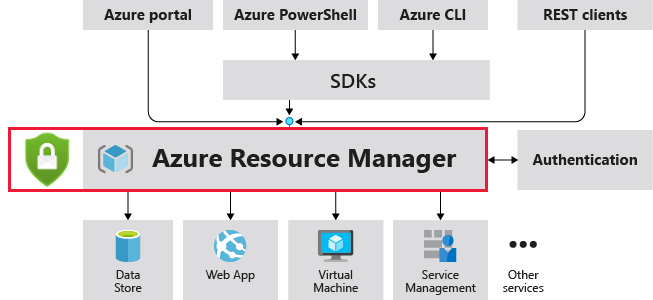
Source: Overview of Defender for Resource Manager.
Why enable it
Control-plane attacks, such as mass role assignments, toolkit-driven enumeration, or bulk resource deletion, look like ordinary administration until you correlate them. Defender for Resource Manager applies threat intelligence and behavioral analytics to the management layer so those actions stand out.
| Without Defender for Resource Manager | With the plan enabled |
|---|---|
| Malicious admin actions hide inside the Activity Log | Suspicious control-plane operations raise alerts |
| Attack-toolkit patterns are hard to recognize | Detections map to known cloud attack techniques |
| Compromised automation identities act freely | Anomalous principal behavior is flagged for response |
| Subscription-level risk has no dedicated owner | Alerts route to a defined control-plane response process |
Value in one line: it watches the one layer every cloud change flows through, turning silent control-plane abuse into an actionable alert.
How it works
Every deployment, role assignment, and configuration change in Azure passes through Azure Resource Manager, and each operation is recorded in the Activity Log. Defender for Resource Manager analyzes that stream with threat intelligence and behavioral models tuned to known cloud attack toolkits, so activity such as mass permission changes, suspicious use of exploitation frameworks, or bulk resource deletion stands out from routine administration.
Detections arrive as Defender for Cloud alerts that name the principal, operation, and scope, which lets responders correlate them with Entra sign-ins and privileged role activity. Retaining Activity Log data supports the deeper investigation that a control-plane incident usually requires.
Enable
- Identify subscriptions and management groups that form the security boundary.
- In Defender for Cloud Environment settings, select each subscription.
- Enable Resource Manager and save.
- Review Azure RBAC, privileged role activation, locks, policy, and activity logs.
- Define response ownership for subscription-level and tenant-level incidents.
- Export alerts to the central incident platform when required.
Verify and operate
- Confirm the plan is enabled across all intended subscriptions.
- Preserve Azure Activity Log data for investigations and compliance needs.
- Correlate alerts with Entra sign-ins, role changes, and deployment history.
- Pre-authorize containment actions for compromised automation identities.
- Monitor newly created or moved subscriptions for configuration drift.
Architecture and prerequisites
- Data source: analyzes Azure Resource Manager operations recorded in the Activity Log. No agent is required.
- Scope: a per-subscription plan; enable it across every subscription in the security boundary, including new and moved subscriptions.
- Retention: export the Activity Log to a Log Analytics workspace (the
AzureActivitytable) for investigation beyond the default retention window. - Permissions: Security Admin / Owner to enable.
Detections and MITRE ATT&CK
| Example detection | ATT&CK tactic |
|---|---|
| Activity matching known cloud attack toolkits | Discovery |
| Suspicious granting of privileged roles | Privilege Escalation |
| Mass or unusual resource deletion | Impact |
| Operations from a risky or anonymized IP | Defense Evasion |
Correlate these alerts with Entra SigninLogs, AuditLogs, and Privileged Identity Management activations to separate legitimate administration from abuse.
Note
Resource Manager protection observes the Azure control plane. It does not replace workload-specific plans, Entra ID Protection, or privileged identity management.
Operational decisions
- Identify the approved deployment identities and automation windows so analysts can distinguish expected infrastructure change from privilege escalation.
- Require change approval for role assignments and policy changes, and use PIM for privileged human access rather than standing subscription ownership.
- Retain operation ID, caller identity, target scope, role or resource delta, change record, and reversal evidence with the alert.
Business example
Defender raises an alert after an automation identity assigns itself Owner on a subscription outside its normal deployment window. Responders correlate the operation with
AzureActivity, Entra sign-ins, and PIM records, revoke the credential, remove the unexpected role assignment, and move the automation to a least-privilege custom role.