Microsoft Defender for App Service Overview
Last updated: 2026-07-27
References
Defender for App Service detects attacks against supported applications hosted on Azure App Service by correlating platform and workload signals. It watches for reconnaissance, exploitation attempts, dangling DNS takeover, and post-exploit behavior that a web application firewall alone would not surface.
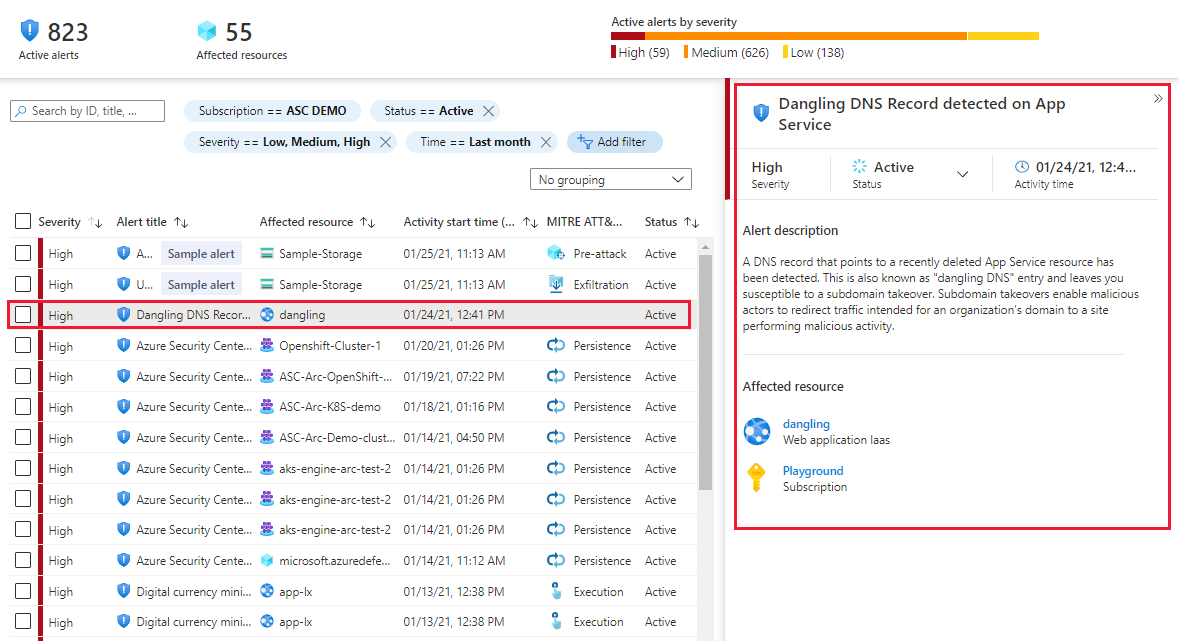
Source: Overview of Defender for App Service.
Why enable it
Public web apps are probed constantly. Because App Service manages the underlying platform, Defender can combine its host-level visibility with your application signals to detect attacks that never appear in application logs alone.
| Without Defender for App Service | With the plan enabled |
|---|---|
| Web attacks are inferred from scattered app logs | Platform and workload signals are correlated into clear alerts |
| Dangling DNS and subdomain takeover go unnoticed | Dedicated detections flag exposed and orphaned endpoints |
| Post-exploitation activity blends into normal traffic | Behavioral analytics highlight suspicious process and network actions |
| Security relies solely on a WAF at the edge | Runtime detection adds defense behind the front door |
Value in one line: it gives hosted web apps host-aware threat detection that reaches attacks a perimeter firewall cannot see.
How it works
Because App Service is a managed platform, Defender can see signals the application never logs, including underlying host process behavior, sampled request telemetry, and platform events, then correlates them with known attack patterns. That combination surfaces reconnaissance, exploitation attempts, and post-compromise actions such as a suspicious process launched by the web worker.
It also watches for issues specific to hosted apps, including dangling DNS entries that could allow subdomain takeover after a site is deprovisioned. Detections appear as Defender for Cloud alerts with investigation context, so responders can move from alert to the affected app, deployment slot, and recommended action quickly.
Enable
- Inventory App Service apps, APIs, deployment slots, plans, and environments.
- Check operating system, hosting option, and region against current support.
- In Defender for Cloud Environment settings, select the subscription.
- Enable App Service under Defender plans and save.
- Review recommendations for TLS, identity, authentication, networking, and secrets.
- Route alerts to the application and security response owners.
Verify and operate
- Confirm protected apps appear in Defender for Cloud inventory.
- Review recommendation and alert coverage after the documented activation time.
- Validate diagnostic settings and application telemetry needed for investigation.
- Keep deployment credentials out of source code and rotate exposed secrets.
- Test application containment and slot rollback procedures.
Architecture and prerequisites
- Signal sources: correlates App Service platform logs, sampled request telemetry, and host process behavior. No application code change or agent is required.
- Scope: enabled per subscription under Defender plans; billed per App Service instance.
- Coverage nuance: Windows and Linux App Service is supported; Azure Functions and other serverless hosting can differ. Confirm support in the current matrix.
- Permissions: Security Admin / Owner on the subscription.
Detections and MITRE ATT&CK
| Example detection | ATT&CK tactic |
|---|---|
| Web shell upload or suspicious process from the web worker | Persistence / Execution |
| Dangling DNS entry eligible for subdomain takeover | Initial Access |
| Connection to a known cryptomining or C2 host | Command and Control |
| Vulnerability-scanner fingerprint against the app | Reconnaissance |
Stream App Service diagnostic settings to Log Analytics so investigations have request-level context, and export alerts to Sentinel for correlation with WAF and identity signals.
Note
App Service plan support is specific. Azure Functions and other serverless hosting options can have different eligibility, telemetry, or protection. Check the current support matrix rather than assuming all PaaS apps are covered.
Operational decisions
- Maintain an inventory of application owners, deployment slots, custom domains, and managed identities; App Service findings need this context to be actionable.
- Treat domain removal and identity changes as controlled releases, with rollback ownership and validation of the production hostname before completion.
- Retain site name, slot, source IP, deployment identity, request evidence, and the related change record for each investigation.
Business example
After retiring a marketing app, a team leaves its custom DNS CNAME in place. A Defender for App Service dangling-DNS alert identifies the subdomain-takeover risk. The application owner removes the orphaned record, reviews the remaining custom domains, and adds DNS cleanup to the decommissioning runbook.