Microsoft Defender for Business Overview
Last updated: 2026-07-27
Microsoft Defender for Business delivers endpoint protection for small and medium-sized organizations. It can be licensed separately or included in eligible Microsoft 365 Business Premium subscriptions. It packages enterprise-grade endpoint security into a simplified, guided experience sized for lean IT teams.
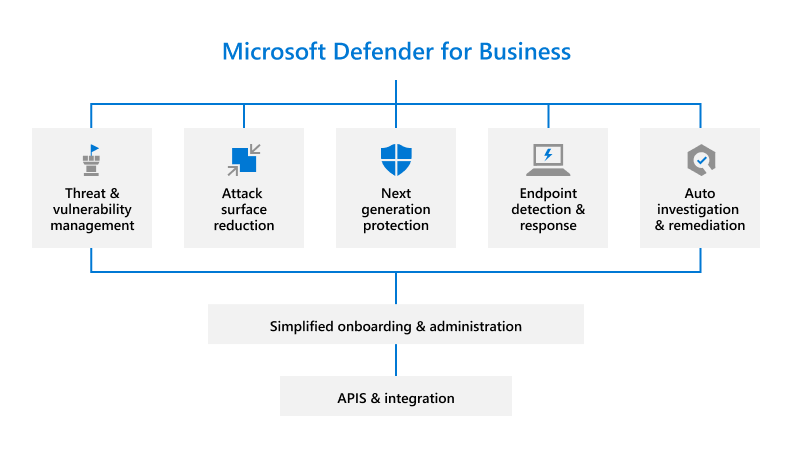
Source: What is Microsoft Defender for Business.
Why enable it
Smaller organizations face the same ransomware and phishing threats as large enterprises but rarely have a dedicated security team. Defender for Business delivers next-generation antivirus, EDR, and automated remediation with defaults and guided setup so protection does not require a specialist.
| Without Defender for Business | With it enabled |
|---|---|
| Consumer antivirus with limited response | Enterprise-grade EDR with automated remediation |
| Security requires deep expertise | Guided setup and secure defaults do the heavy lifting |
| Threats are handled reactively | Automated investigation contains common attacks |
| Devices are managed inconsistently | Central portal covers Windows, macOS, and mobile |
Value in one line: it gives small teams enterprise-class endpoint detection and automated response without needing a dedicated security operations center.
How it works
Defender for Business packages the Defender for Endpoint engine, including next-generation antivirus, attack surface reduction, and behavioral EDR, into a streamlined experience with security-hardened defaults and a guided setup wizard, so protection is effective without deep configuration. Devices are onboarded through Microsoft Intune or a simple local script across Windows, macOS, iOS, and Android.
Automated investigation and response handles common threats without analyst intervention, and threat and vulnerability management highlights the weaknesses that matter most. Servers can be added through a per-server add-on, and the same portal and incidents scale up if the organization later moves to enterprise Defender plans.
Configure
- Confirm tenant eligibility, user and server limits, and included licenses.
- Complete the guided setup in the Microsoft Defender portal.
- Onboard a pilot set of Windows, macOS, Linux, Android, or iOS devices that meet the current platform requirements.
- Review default next-generation protection, firewall, and attack-surface settings.
- Integrate Intune when available and define device groups and roles.
- Purchase and assign server coverage separately when required.
Verify and operate
- Confirm every intended device appears and reports healthy sensor status.
- Run the documented Defender for Endpoint detection test on a test device.
- Review incidents, vulnerabilities, and automated remediation actions.
- Maintain emergency contacts and an isolation recovery procedure.
- Reassess licensing when organization size or security needs grow.
Architecture and prerequisites
- Engine: the Defender for Endpoint stack with SMB-tuned defaults and a guided wizard; onboarding via Intune or a local script across Windows, macOS, iOS, and Android.
- Limits: designed for up to 300 users; servers require the Defender for Business servers add-on.
- Automation: Automated Investigation and Response is on by default to remediate common threats without an analyst.
- Portal: the same Microsoft Defender portal and incident model used by enterprise plans, so growth is a license change, not a migration.
Operate
Run the documented detection test on a pilot device, review incidents and vulnerability findings weekly, and keep an isolation and recovery runbook. Reassess licensing when the organization approaches the user or server limits, or needs enterprise features such as advanced hunting.
Note
Defender for Business is not Defender for Cloud. Servers can be protected through a Defender for Business server add-on or through Defender for Servers, depending on architecture and licensing.
Operational decisions
- Name an owner for endpoint policy changes, isolation approval, user support, and recovery so a small IT team can act quickly without unclear escalation.
- Roll security settings out through device groups and measure application impact before applying attack-surface rules tenant-wide.
- Retain device ID, assigned policy, incident evidence, automated action, user notification, and recovery outcome in the support record.
Business example
A 75-person company on Microsoft 365 Business Premium onboards a pilot group of ten Windows laptops through Intune. Defender for Business contains a simulated ransomware-like process automatically, the IT generalist verifies recovery, and the company uses the same policy assignment to onboard the remaining devices in waves rather than relying on each employee to install protection manually.