Microsoft Defender for Containers Overview
Last updated: 2026-07-27
References
Defender for Containers provides posture management, registry image vulnerability assessment, and runtime threat protection for supported Kubernetes environments.
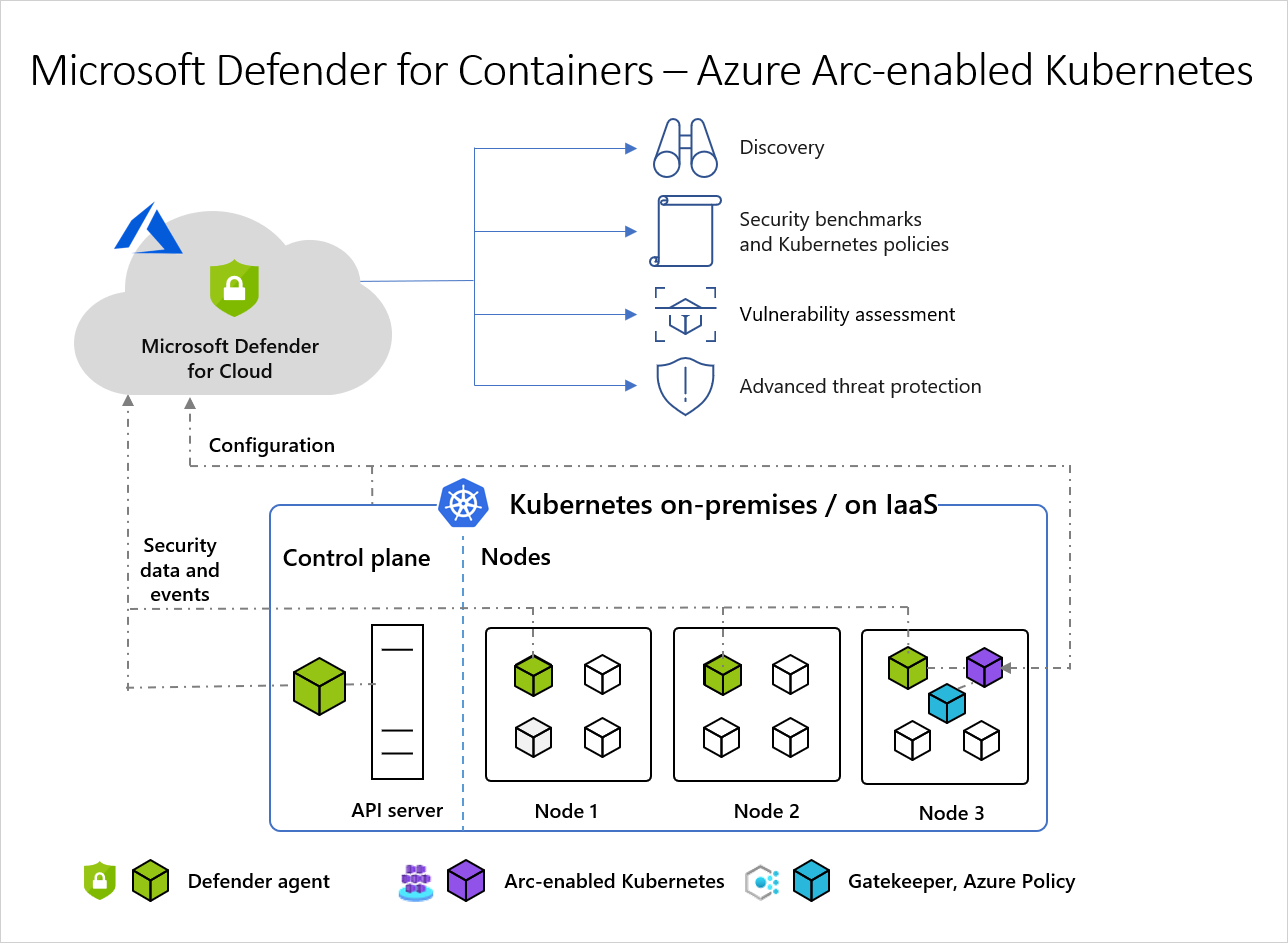
Source: Microsoft Defender for Containers architecture.
Why enable it
Containers move fast, scale automatically, and are often built from third-party images, which makes vulnerable or misconfigured workloads easy to miss. Defender for Containers covers the full lifecycle: build, registry, and runtime. As a result, a known-vulnerable image or a suspicious in-cluster action is caught early.
| Without Defender for Containers | With the plan enabled |
|---|---|
| Image vulnerabilities are found after deployment, if at all | Registry and runtime image scanning flags them before and during use |
| Kubernetes misconfigurations rely on manual review | Posture recommendations and hardening guidance are continuous |
| Runtime attacks blend into normal cluster noise | Behavioral threat detection raises alerts on suspicious activity |
| Each cloud's clusters are assessed separately | AKS, EKS, GKE, and Arc clusters share one control plane |
Value in one line: it secures the container supply chain and the running cluster together, instead of trusting that every image and workload is clean.
How it works
Defender for Containers protects three stages of the container lifecycle. At build and registry time it scans images in supported registries for known vulnerabilities, so a risky image is flagged before it ever runs. At the cluster level, agentless discovery and Azure Policy assess Kubernetes configuration against hardening best practices. At runtime, a Defender sensor deployed to the nodes watches process, network, and Kubernetes audit activity for behavior that matches known attack techniques.
Coverage follows where the cluster lives: AKS integrates natively, while Amazon EKS, Google GKE, and other conformant clusters connect through a cloud connector or Azure Arc. Because Defender detects and recommends rather than enforces, blocking a non-compliant deployment still requires an admission controller such as Azure Policy for Kubernetes or Gatekeeper.
Where it applies
| Environment | Connection model |
|---|---|
| Azure Kubernetes Service (AKS) | Native Azure resource integration |
| Azure Red Hat OpenShift (ARO) | Connect the cluster through Azure Arc for supported runtime coverage |
| Amazon EKS | AWS connector and selected Defender components |
| Google GKE | GCP connector and selected Defender components |
| Other conformant Kubernetes | Azure Arc-enabled Kubernetes, subject to the support matrix |
Enable
- Confirm cluster distribution, version, operating systems, and network egress.
- Connect non-native clusters with the appropriate cloud connector or Azure Arc.
- Enable Defender for Containers in Environment settings.
- Review settings for agentless discovery, registry assessment, Azure Policy, and the Defender sensor; enable only supported components.
- Confirm extension pods can be scheduled and reach required endpoints.
- Define admission policy separately if deployments must be blocked.
Verify and operate
- Check cluster, node, registry, image, and extension health in inventory.
- Confirm new images receive vulnerability results within the documented period.
- Review runtime alerts and Kubernetes audit-data availability.
- Track privileged workloads, exposed services, vulnerable images, and stale data.
- Test response actions in a non-production namespace.
Architecture and prerequisites
- Defender sensor: a DaemonSet on cluster nodes provides runtime threat detection; it needs schedulable capacity and outbound access to Defender endpoints.
- Agentless discovery: reads the Kubernetes API and, for supported clouds, the control plane to assess configuration without a sensor.
- Registry scanning: images in supported registries (Azure Container Registry and connected AWS/GCP registries) are scanned on push, on pull, and continuously against the Microsoft feed.
- Azure Policy for Kubernetes: a Gatekeeper-based admission add-on evaluates and can enforce policy at deployment time.
- Permissions: onboarding requires Security Admin / Owner on the subscription and cluster-admin equivalent to install components.
Detections and MITRE ATT&CK
| Example detection | ATT&CK tactic |
|---|---|
| Exec into a container or suspicious shell in a pod | Execution |
| Privileged container or host-filesystem mount | Privilege Escalation |
| Crypto-mining process behavior | Impact |
| Anomalous access to the Kubernetes API | Discovery |
| Deployment of a known-malicious image | Initial Access |
Runtime detections correlate node-level sensor telemetry with Kubernetes audit logs, so control-plane and workload behavior are analyzed together.
Audit correlation and response limits
Verify that the supported cluster integration can obtain the Kubernetes audit signals needed for your environment, and treat missing or stale audit data as a coverage issue rather than evidence that no control-plane activity occurred. Managed Kubernetes offerings can restrict audit-policy configuration, retention, or direct access to control-plane logs; use the current product architecture and cluster documentation to establish what is available before creating a detection or response runbook that depends on those events.
Keep node, control-plane, registry, and CI/CD clocks aligned to a common time source so an image push, deployment, API call, and runtime alert can be correlated reliably. During an incident, capture the cluster, node, namespace, pod UID, container image digest, service account, Kubernetes API event reference, and deployment revision before deleting or restarting a workload. Deleting a pod can remove the strongest evidence of the observed runtime state.
Define an approved containment ladder with the platform team: restrict ingress, scale a deployment to zero, revoke a service-account permission, isolate a node, or preserve the workload for forensics. The correct action depends on workload criticality and cluster architecture; it must not be selected solely from the alert title.
Hardening and enforcement
- Use registry scan results as a CI/CD gate so vulnerable images fail the pipeline before deployment.
- Enforce baseline controls (no privileged pods, read-only root filesystem, approved registries) with Azure Policy for Kubernetes or Gatekeeper in deny mode after piloting in audit mode.
- Restrict who can schedule privileged workloads or expose services, and work the Kubernetes hardening recommendations in secure score.
Note
Defender recommends and detects; Azure Policy for Kubernetes, Gatekeeper, or another admission controller performs preventive enforcement. ARO's managed control plane also limits which components customers can directly manage.
Operational decisions
- Separate image-risk ownership from cluster-runtime ownership; registry teams patch images while platform teams control admission and workload containment.
- Begin new admission controls in audit mode and define an exception process for break-fix deployments before enforcing deny.
- Preserve image digest, namespace, service account, cluster, and deployment version with every finding so responders can identify the exact workload.
Business example
A registry scan identifies a critical vulnerability in an image used by an AKS production deployment. The security team opens a remediation task for the image owner, while the platform team adds an Azure Policy audit rule for that image tag. After the patched image is released, the policy is moved to deny mode so future deployments cannot use images with the same prohibited condition.